Use Case-Sales & Business Development

Use Case-Sales & Business Development
How to build quality relationships, not mass campaigns
Your time has a value.
Stop switching between your email, LinkedIn, a CRM, and a spreadsheet. Kuerate's native CRM
brings your entire sales workflow into one place.
Flooded inboxes. Spam. No replies. This is the new reality of a market where emails are
costless and contact data is freely available. Every sales professional faces the same challenge:
how do you stand out and make that all-important connection, short of a warm introduction or a
physical meeting?
The numbers tell the story:
The Challenge | Current Reality | The Cost |
Email overload | Average professional receives 120+ emails/day | Your outreach gets lost in noise |
AI-generated content | LinkedIn feed increasingly dominated by AI content | Engagement and trust declining |
Mass campaigns | Sales teams send thousands of identical messages | Response rates below 1% |
No signal | No way to know if a prospect is open to contact | Time wasted on unresponsive targets |
Credibility gap | No differentiation between quality and spam senders | High-value prospects disengage entirely |
How to get the right message to the right person at the right time!!!
Kuerate is built to create exactly that environment.
Why LinkedIn is No Longer Enough
LinkedIn has over one billion users. That scale, once its greatest strength, has become its
greatest weakness. Content is increasingly AI-generated and algorithmically opaque. Cold
outreach is unlimited and free — which means everyone does it, and no one stands out.
The result: professionals are tuning out. Senior decision-makers — CFOs, GCs, Partners,
Heads of Strategy — are the hardest people to reach and the most valuable to your pipeline.
They receive the most outreach and respond to the least.
Kuerate was built for exactly this gap.
Think of Kuerate as your own private professional network — like LinkedIn, but where users are
more discerning, content is more curated, and every outreach has a genuine signal of intent
attached to it.
Smaller, higher-quality network | Kuerate is a curated community of professionals who have chosen quality over volume. Your target audience is genuinely engaged. |
Outreach has a cost and intent signal | Professionals may opt to charity-gate their access, and sending a message may require a charitable donation. This filters out spam and signals that you value the recipient's time. |
Value alignment visible upfront | Charitable contributions are shown on your profile. Prospects can see your values before they read your pitch. |
Engagement score | Every professional has a responsiveness score (0–10). You can target people who actually respond before spending a donation. |
Native CRM built in | No juggling multiple tools. Pipeline, contacts, outreach, and conversation history in one place. |
Curated content reaches targets | Custom interest filters and connection status mean your content has a high probability of being seen by the right audience. |
Kuerate rewards a deliberate, relationship-first approach. Here is how to get started and build
momentum.
Step 1 — Set Up Your Profile
Your Kuerate profile is your first impression. Unlike LinkedIn, it is not a CV — it is a values
statement. Prospects will look at it before deciding whether to accept your message.
•Upload a professional photo and write a concise bio that leads with what you can do for
others, not what you sell.
•Set your title and company clearly.
•Add your interest tags — this determines whose content you see and who sees yours.
•Your charitable contributions will be displayed on your profile automatically as you use the
platform.
Profile tip Lead with your value proposition and your cause. 'I help CFOs at mid-market
firms reduce treasury risk — and I support financial literacy charities' is more compelling
than a job title.
Step 2 — Choose Your Causes
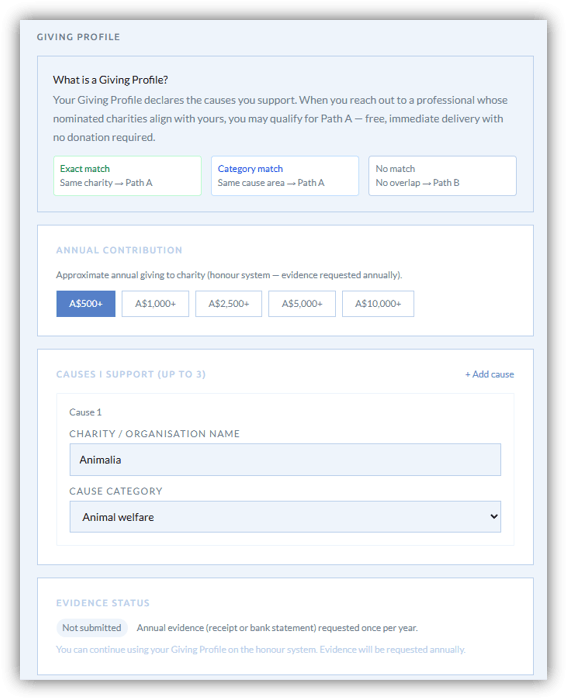
This is the most powerful differentiator Kuerate offers. When you get setup, you or your organisation can opt to support a cause either annually or per outreach message. This is a signal and may appeal to your target audience.
•Research what causes your target sector tends to support — ESG, education, health,
poverty alleviation.
•Select causes that align with your own values — authenticity is visible.
•Your charity contributions are shown on your profile, signalling your value alignment before
a conversation even starts.
•Start with causes that have broad appeal across your target audience.
Strategic insight A CFO who sees that you donated to a e.g financial literacy charity before
reaching out has already formed a positive first impression. That's the conversation before
the conversation.
Step 3 — Invite Your Network
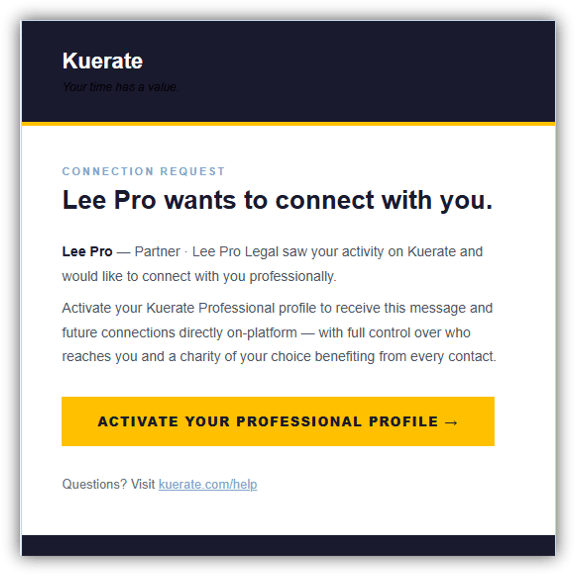
One of the most powerful first moves on Kuerate is to bring your best existing contacts onto the
platform. This seeds your network with people you already have a relationship with, and signals
to them that you value a higher-quality channel.
•From any professional's profile, click 'Invite to connect' — this counts as one outreach
message against your monthly allowance (5)
•Your invitation email highlights the platform's values: no spam, quality outreach, charity-
linked contact.
•Focus first on senior contacts who you know are frustrated with LinkedIn noise.
•Your invitation should reflect your chosen causes — it is a pre-signal of value alignment.
Framing tip Frame your invitation around the benefit to them: 'I'm moving my serious
professional outreach to Kuerate — it's invitation-only, no spam, and every message funds a
charity. I thought you'd appreciate the signal-to-noise ratio.'
Step 4 — Build Your Target List
Start small and focused. The Kuerate model rewards quality over volume. A list of 20 highly
relevant, engaged prospects will outperform a list of 2,000 cold contacts.
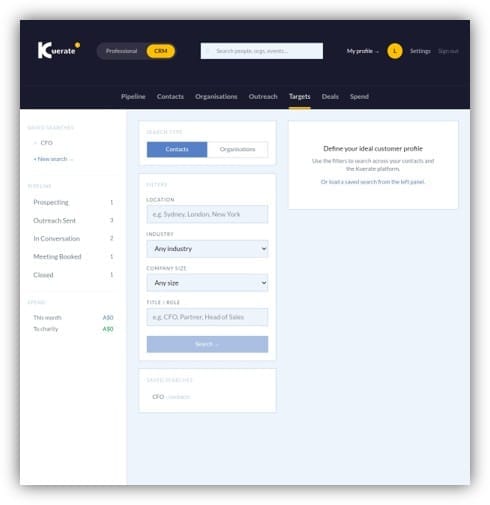
•Use the Targets tab in your CRM to search Kuerate professionals by title, company,
country, and industry.
•Filter by Engagement Score — prioritise prospects rated Responsive or Highly Responsive
(6.0+). Do not waste donation budget on Inactive or Low Engagement contacts.
•Check their access rate — this tells you their suggested charity donation and gives you a
sense of how they value their time.
•Import your existing LinkedIn network via CSV — Kuerate will automatically match contacts
who are already on the platform.
•Save your ideal customer profile (ICP) searches for one-click access.
Step 5 — Create Quality Content
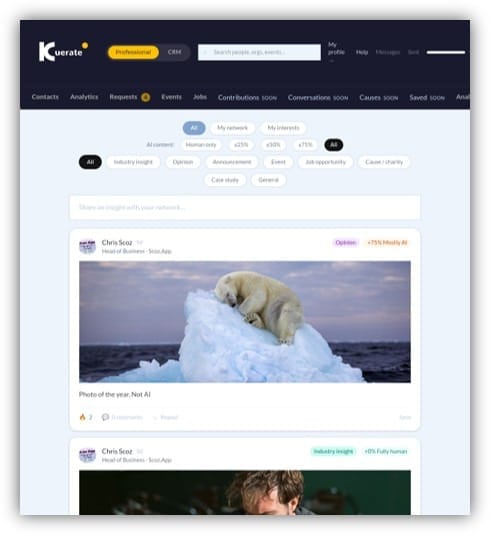
Because Kuerate's feed is smaller and more curated, your content has a far higher probability of
being seen by your target audience. This is a captive market — use it strategically.
•Post content that is genuinely useful to your target sector — insights, case studies, industry
analysis.
•Mandatory AI disclosure on every post means your human-written content is clearly
labelled and trusted.
•Use the correct category: Industry insight, Case study, Job opportunity, Cause/charity. This
helps your content reach the right people via interest filters.
•Quality over frequency. Two well-crafted posts per week outperform daily AI-generated
noise.
•Cause/charity posts are particularly powerful — they reinforce your values and attract
aligned professionals.
Step 6 — Send High-Value Outreach
When you are ready to reach out, Kuerate's message system ensures your contact actually
receives and reads your message. You are not sending into a void.
•Write a personalised subject line — the recipient sees it before deciding to open.
•Reference their content or profile — show you have done your research.
•Be clear about why you are reaching out and what value you offer.
•Select the Path A option if you have completed your Giving Profile and your values align
with theirs — this allows free outreach to aligned professionals.
•Otherwise, make the charitable donation — this is the signal that separates you from every
other cold outreach in their inbox.
Message tip Keep your first message short. One paragraph, one clear ask, one reason
why you chose them specifically. The donation has already made the first impression — let
the message do the rest.
Engagement Score — Your Targeting Barometer
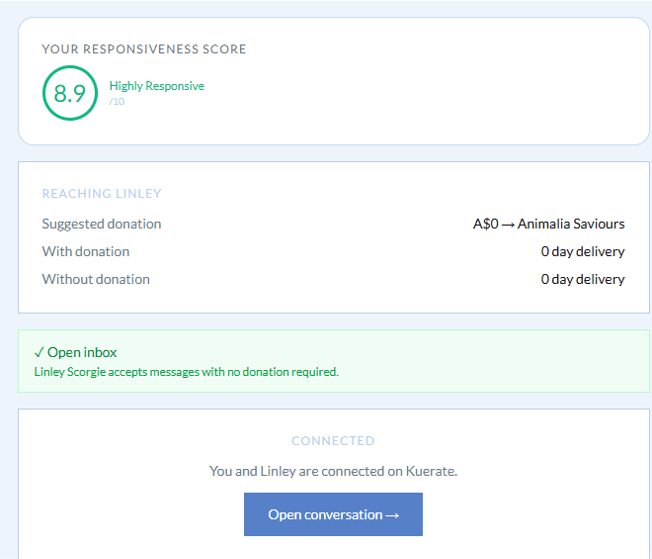
Every professional on Kuerate has an Engagement Score (0–10) based on their responsiveness
to inbound messages over the last 90 days. This is the single most powerful targeting signal
available to you.
Score | Label | What it means for you |
8.0 – 10.0 | Highly Responsive | High priority. This person actively engages with outreach. Invest your donation budget here. |
6.0 – 7.9 | Responsive | Good target. Likely to read and consider your message. |
4.0 – 5.9 | Selective | Proceed with a highly personalised, relevant message. |
2.0 – 3.9 | Low Engagement | Low priority. Consider inviting them to activate their profile instead. |
0.0 – 1.9 | Inactive | Avoid. Your donation is unlikely to generate a response. |
— | Pending | New to platform — fewer than 10 messages received. Neutral risk. |
ROI insight Targeting only Responsive and Highly Responsive contacts can increase your
acceptance rate by 3–5x compared to untargeted outreach. The score is your filter before
you spend.
Native CRM — One System for Your Entire Pipeline
Stop switching between your email, LinkedIn, a CRM, and a spreadsheet. Kuerate's native CRM
brings your entire sales workflow into one place.
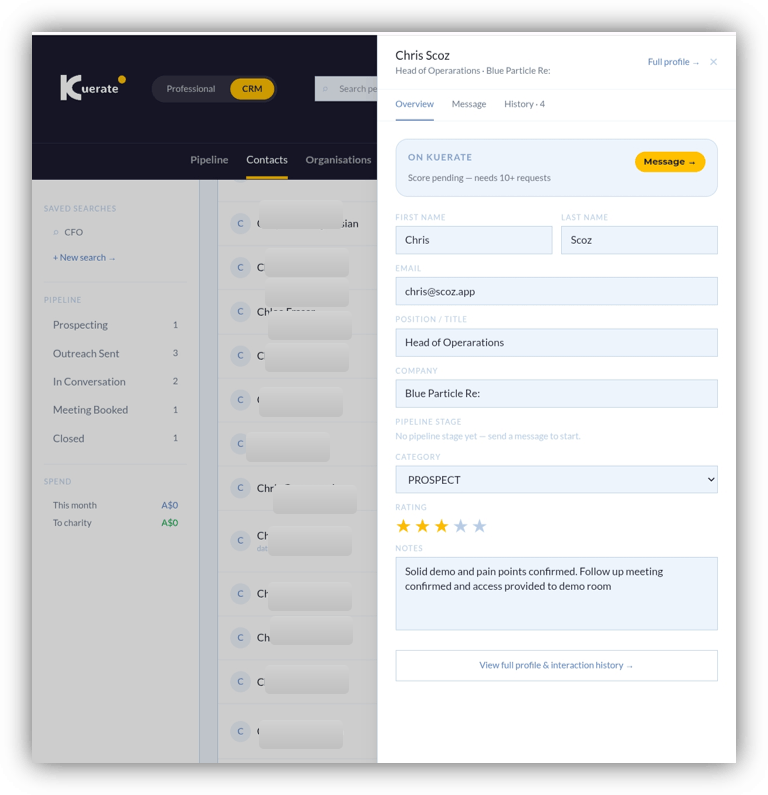
Pipeline | Kanban board with five stages: Prospecting → Outreach Sent → In Conversation → Meeting Booked → Closed. Drag or arrow-navigate deals between stages. |
Contacts | Every contact in one database — on Kuerate, off platform, and LinkedIn imports. Filter by Connected, On Kuerate, In Pipeline, External. |
Contact drawer | Click any contact for a full view: overview, message history, interaction log, deals, notes, star rating, and category. |
Outreach log | Every message you have sent, with status (pending/accepted/declined), donation amount, and direct link to the thread. |
Organisations | Auto-created from contact email domains. Enriched with industry, employee count, and LinkedIn data via Apollo.io. |
Saved ICP searches | Save your ideal customer profile filters for one-click access. Name searches like 'CFO Australia FinTech' and run them instantly. |
Spend tracking | See your total outreach investment and how much has gone to charity on your behalf — month by month. |
Content Strategy — The Captive Audience Advantage
Kuerate's feed is smaller and more curated than LinkedIn. Use it to your advantage. Your
ideal customers are more likely to be in that feed and more likely to see your content.
•Users filter content by interest tags — post content that matches your ICP's interests.
•Users can filter to human-only content — your unassisted posts will be seen preferentially
by those who distrust AI.
•Founding members and verified professionals command greater trust — aim for that status.
•Cause and charity posts earn goodwill and algorithmic visibility with cause-aligned
professionals.
Value Alignment — Path A Access
Complete your Giving Profile to unlock Path A outreach. When your charitable values align with
a professional's values, you can reach them for free — no donation required. This is Kuerate's
reward for authentic cause alignment.
•Go to Settings → Giving Profile to complete your profile.
•Select the causes you genuinely support and have donated to.
•When Kuerate detects value alignment with a target professional, you will see the Path A
option at the message stage.
•Path A messages are delivered faster — typically the same day.
Stage | Kuerate Action | Feature Used |
Identify targets | Search by title, company, country | Targets / ICP Search |
Qualify | Check Engagement Score | Score badge on profile |
Research | View profile, content, causes | Public profile page |
Prioritise | Save ICP search, star contacts | Saved searches, contact rating |
Import network | Upload LinkedIn CSV | LinkedIn import |
Invite to platform | Send platform invitation | Invite button on profile |
Send outreach | Donate + personalised message | Message form / Path A |
Track status | View in Outreach tab | CRM → Outreach |
Follow up | In-app thread reply | Messages → Thread |
Progress deal | Move pipeline stage | CRM → Pipeline |
Log activity | Add note or interaction | Contact drawer → History |
Review spend | Check monthly donation total | CRM → Spend |
Kuerate · Sales & BD Use Case · app.kuerate.com