Kuerate Use Case-Professional

Use Case-Professional
How to reclaim your time, protect your privacy, and make every connection count
Your time has a value.
Quick Links
The Problem — Your Inbox and Feed is Not Yours
You have spent years building your professional reputation. Your network, your expertise, your track record — all hard-earned. Yet every day, your inbox and feed is flooded with unsolicited messages from people you have never met, pitching products you do not need, asking for time you cannot spare.
And it is only getting worse!
The Reality | What is Happening | The Impact on You |
Unlimited cold contact | Anyone can message anyone, unlimited times, at zero cost to them | Your inbox becomes a free advertising channel |
AI-generated noise | LinkedIn feed increasingly dominated by AI content with mandatory biometric verification looming | Engagement declining, trust eroding |
Your data monetised | Platforms sell your professional identity to advertisers without your benefit | You are the product, not the customer |
No filter, no control | No way to signal that your time has a price — so no one respects it | Senior professionals disengage entirely |
Biometric pressure | LinkedIn now requires ID verification — penalising those who refuse with 40% fewer profile views | Your privacy comes at a professional cost |
The core issue is that "cold outreach" is free. That means it is unlimited. And unlimited means noise. The only way to restore signal is to give your time a value that others must respect before reaching you.
What You Are Giving Away for Free
Consider what happens every time someone sends you an unsolicited message:
• You spend time reading it — time you won't recover.
• You spend mental energy deciding whether to respond.
• You receive no compensation, no benefit.
• The sender faces no cost for interrupting you — and will do it again.
Multiply this across your career. The average senior professional receives thousands of unsolicited messages per year. At even a conservative estimate of two minutes per message, that is days of your professional life donated involuntarily to other people's pipelines.
The LinkedIn Problem is Getting Worse
LinkedIn was built on the right idea — a professional network where connections matter. But at one billion users and counting, the signal-to-noise ratio has collapsed. The platform now:
• Generates over $16 billion annually from your data and attention — and returns none of it to you.
• Requires biometric ID verification, penalising non-compliance with reduced visibility.
• Allows unlimited cold InMail with no friction — making your inbox a free-for-all.
• Surfaces increasingly AI-generated content with no disclosure requirement.
• Treats you as the product rather than the customer.
This is not what professional networking should look like. You deserve better.
The Kuerate Solution — Your Terms
Kuerate is a modern professional network built on a single, powerful premise: your time has a value. Every feature is designed to give you control over who reaches you, when, and at what cost — while channelling that value towards causes you care about.
How It Works
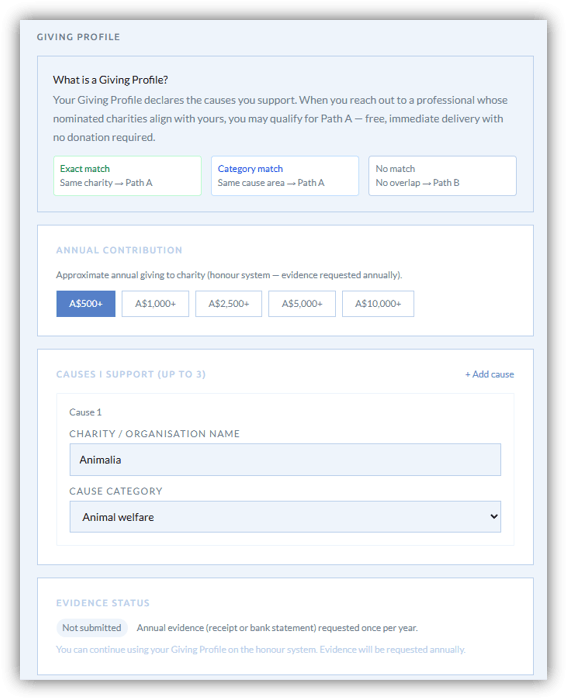
Your access rate | By default, anyone can reach-out to you, OR you can opt to set a nominal "access rate" that people must pay to send you a message/connection request. |
Path A — Free access | Professionals whose charitable values align with yours can reach you for free, immediately. Kuerate detects this alignment automatically. |
Path B — Paid access | Everyone else must donate to your charity to reach you unless you opt to have an "Open Inbox". The donation goes directly to the cause — not to Kuerate. |
Open inbox option | Set your suggested donation to zero for a fully open inbox. All messages delivered immediately at no cost — useful when you are actively seeking opportunities. |
Delivery delays | You control how quickly messages are delivered — with donation vs without. A shorter delay for donors incentivises giving without blocking anyone. |
Your charity, your call | Choose from 1.7 million registered charities across Australia, the UK and the United States. Change it anytime. [NB: This service is not activated pending integration with charity service providers] |
Control your Feed | Enhanced filters and interest tags now specify what content will reach you, and you can set an AI level filter, controlling the AI slop. |
Super Events | Creating Events on Kuerate now delivers the ongoing connections that Events were meant to be. You will automatically be connected with all participants or opt out within 5 days after |
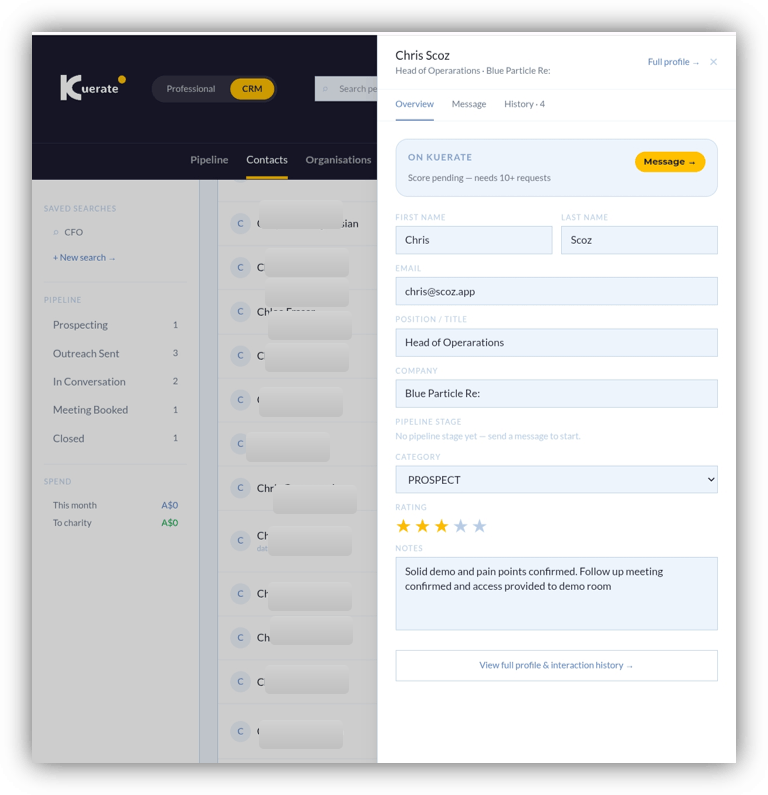
Personal CRM | Actually nurture your contacts and connections with a full CRM capability to categorise, rate and engage with your networks |
The principle You are not selling access to yourself. You are requiring that anyone who wants your attention demonstrates they value it — by contributing to a cause you believe in.
What Changes When You Join Kuerate
Before Kuerate | After Kuerate | The difference |
Inbox flooded with cold outreach | Only messages that have earned access reach you | Signal restored |
Your data sold to advertisers | No advertising, no data selling, ever | You are the customer |
Biometric ID required | Business email only — no scanning | Privacy protected |
Zero benefit from cold contact | Every accepted message funds your charity | Your time creates impact |
No way to signal your values | Charitable contributions visible on your profile | Values-first first impression |
Disconnected tools and inboxes | Personal CRM, messages, connections in one place | One system for everything |
No Biometrics. Ever.
Kuerate will never require biometric verification. Your verified business email is your credential. Refusing to provide biometric data will never cost you visibility, features, or access on this platform. Your privacy is non-negotiable.
No Ads. No Data Selling.
Kuerate is funded by subscription and processing fees only. Your professional data — your connections, your content, your behaviour on the platform — is never sold, never shared, never used to target you with advertising. Ever.
Your Step-by-Step Playbook
Getting the most from Kuerate as a professional takes less than an hour to set up. Here is how to go from signup to a fully active, curated inbox.
Step 1 — Create Your Profile
Your Kuerate profile is public and visible to anyone who searches for you. Unlike a CV, it is a values statement as much as a professional record.
• Upload a professional photo — profiles with photos receive significantly more connection requests.
• Write a concise bio that reflects your expertise and what you are genuinely interested in.
• Set your title, company and location.
• Add your interest tags — these determine whose content appears in your feed and who can find you via ICP search.
• Add your LinkedIn URL if you want to cross-reference your profile.
• Set a status line — a short sentence about what you are currently focused on or open to.
Profile tip Your charitable contributions will be displayed automatically on your profile as you receive and accept messages. This becomes a trust signal for aligned professionals considering reaching out.
Step 2 — Choose Your Charity
Your nominated charity is central to the Kuerate model. Every cold message that reaches you generates a donation to this cause. Choose something you genuinely believe in — it will be visible on your profile and will attract like-minded professionals.
• Go to Settings → Access Rate to search and select your charity.
• Search from 1.7 million registered charities across Australia, the UK and the United States.
• You can change your charity at any time — your historical donations remain attributed.
• Consider causes that resonate with your professional sector — this increases value alignment with incoming contacts.
Step 3 — Set Your Access Rate
Your access rate is the suggested donation amount for anyone who wants to cold-contact you. You set the amount — Kuerate does not. There is no minimum and no maximum.
Suggested donation | The amount you suggest. Senders can choose to donate more, less, or nothing — but donating shortens their delivery time significantly. |
Delay with donation | How quickly a message is delivered when the donor gives. Recommended: 1 day. This rewards the donation without being punitive. |
Delay without donation | How quickly a message is delivered without a donation. Recommended: 7–10 days. This creates a strong incentive to give. |
Open inbox (zero rate) | Set your suggested rate to zero for a fully open inbox. All messages arrive immediately. Useful when actively seeking new opportunities. |
Path A (value alignment) | Professionals whose charitable values match yours can reach you for free, immediately — regardless of your access rate. |
Calibration tip Start with a modest suggested donation — A$20 to A$50. This filters spam without deterring genuine, high-quality outreach. You can adjust it at any time based on the quality of messages you receive.
Step 4 — Import Your LinkedIn Network (under 2 minutes)
Bring your existing network onto Kuerate in minutes. Your LinkedIn connections become your Kuerate contacts — automatically matched to Kuerate profiles where they exist.
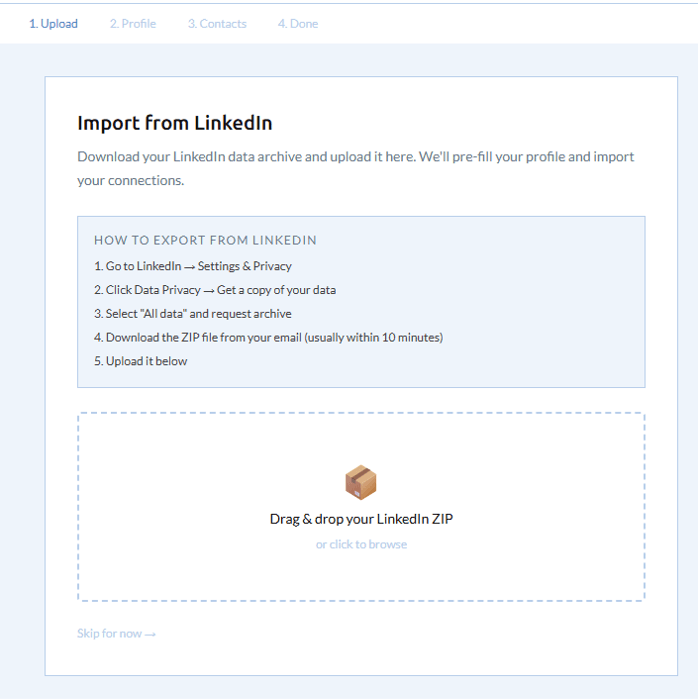
• Export your LinkedIn connections as a CSV from LinkedIn → Settings → Data Privacy → Get a copy of your data → Connections.
• Go to Dashboard → Import LinkedIn and upload the CSV file.
• Kuerate matches imported contacts to existing Kuerate users and flags them as On Kuerate in your CRM.
• Unmatched contacts are stored as external contacts — you can invite them to join Kuerate from their contact card.
Step 5 — Manage Your Requests Inbox
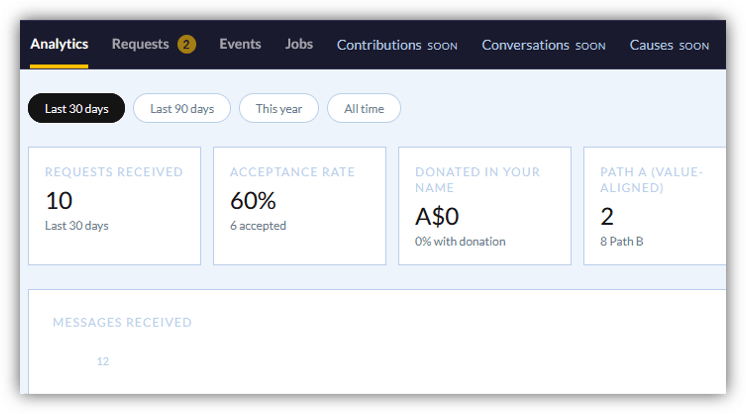
Your Requests tab is where inbound outreach appears. Each message shows the sender's name, company, category, subject, and whether a donation was made. You have full control over what happens next.
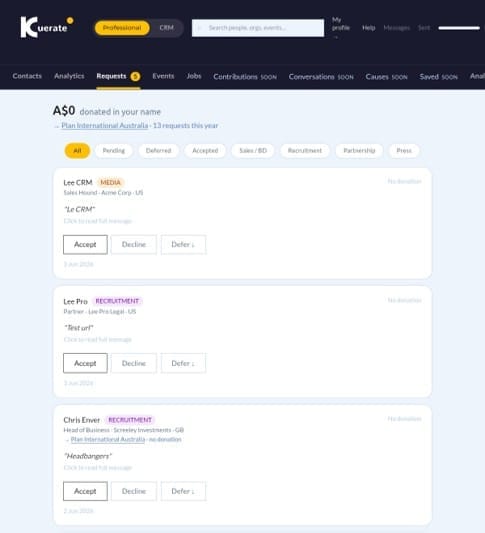
Accept | Opens an in-app conversation thread. The sender is added to your CRM contacts automatically. Use for messages you want to engage with. |
Decline | Closes the request. The sender is notified. The donation to your charity is retained regardless of your decision. |
Defer | Moves the message to the bottom of your queue for later review. Useful when you want to consider it but are not ready to commit. |
• Filter your inbox by status: All, Pending, Accepted, Declined, Deferred.
• Filter by category: Sales/BD, Recruitment, Partnership, Press, General.
• Check the sender's Engagement Score — this tells you how responsive they are to professional contact. Highly responsive senders are more likely to follow through.
Inbox management tip Review your requests once a day. Defer anything that needs more thought. Decline promptly — it is a professional courtesy and keeps your inbox clean.
Step 6 — Use Your Feed Strategically
The Kuerate feed is smaller and more curated than LinkedIn. That means your content reaches a more relevant audience, and the content you see is more likely to be genuinely useful.
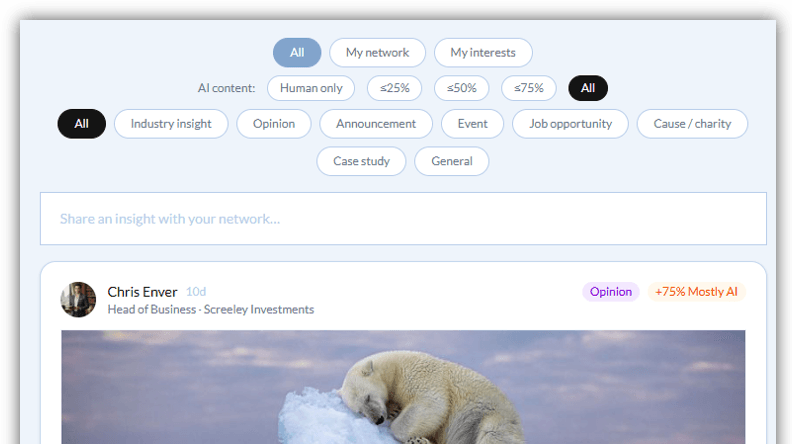
• Post content that reflects your expertise — Industry insights, Case studies, Opinion pieces. Your posts will be seen by professionals with matching interest tags.
• Use the AI disclosure selector on every post — this is mandatory and builds trust. Human-written content is clearly labelled and preferred by many users.
• Use the feed filters to show only human-written content, or to filter by AI disclosure level.
• Follow your network and interests tabs to curate what you see.
• Engage with posts that resonate — likes and comments build your presence and increase your content visibility.
Step 7 — Build Connections That Matter
Every accepted message on Kuerate creates a connection — a bidirectional record of a professional relationship that has been initiated with genuine intent. These connections are qualitatively different from LinkedIn connections, which cost nothing and mean little.
• Accepted messages automatically create an in-app thread for ongoing conversation.
• Connected contacts are tracked in your CRM with full interaction history.
• Use the pipeline to track relationships that may lead to opportunities — board roles, partnerships, advisory positions, collaborations.
• Your connections feed appears in the My Network tab of your feed — a curated view of what matters most.
Key Features for Professionals
Your Requests Inbox — Quality by Design
Every message in your Requests tab has been filtered by the system before it reaches you. Spam is structurally impossible — the donation requirement eliminates it at source.
Donation filter | Every cold message requires a charitable donation (unless Path A applies). This alone eliminates the vast majority of low-quality outreach. |
Category labelling | Every message is categorised: Sales/BD, Recruitment, Partnership, Press, General. You see the intent before you open the message. |
Sender profile | Click through to the sender's Kuerate profile before accepting. See their charity, their content, their connections. |
Engagement Score | See how responsive the sender is to professional contact. A high score tells you they are genuinely engaged — not just blasting outreach. |
Delivery delays | Messages without a donation arrive later — giving you a natural priority queue of people who valued your time enough to give. |
Retain donations | Charitable donations are retained regardless of whether you accept or decline. Your cause benefits from every contact attempt. |
Engagement Score — Know Your Callers
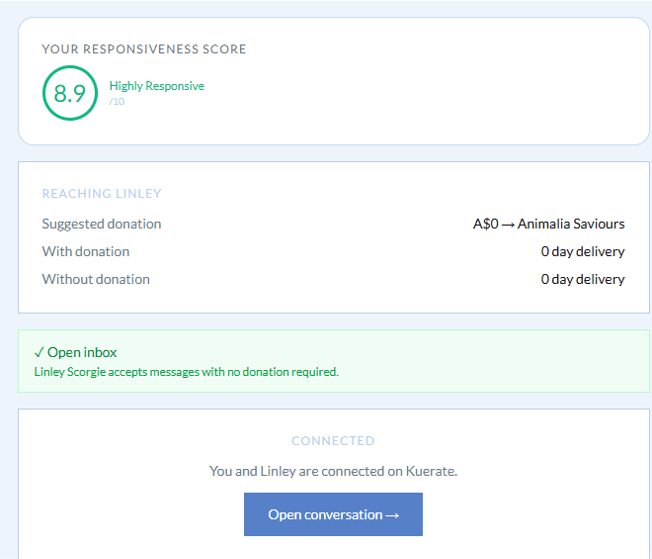
The Engagement Score tells you how responsive a sender is to professional contact — based on their last 90 days of activity on the platform. Use it to prioritise your inbox.
Score | Label | What it means |
8.0 – 10.0 | Highly Responsive | Actively engages with professional contact. High-quality sender worth prioritising. |
6.0 – 7.9 | Responsive | Generally responds to outreach. A reliable professional contact. |
4.0 – 5.9 | Selective | Chooses carefully. If they reached out to you, you were specifically targeted. |
2.0 – 3.9 | Low Engagement | Rarely responds. Proceed with lower expectations. |
0.0 – 1.9 | Inactive | Very rarely engages. Consider declining. |
— | Pending | New to platform — fewer than 10 messages sent. Treat as neutral. |
Your Feed — Content Worth Reading
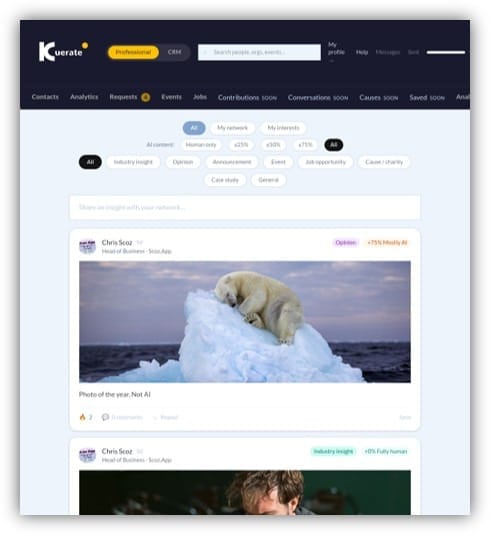
The Kuerate feed is designed to surface content that is genuinely useful to you, from professionals you have chosen to follow or whose interests match yours.
• Feed mode: All (everyone), My Network (connections only), My Interests (matching interest tags).
• AI content filter: set a maximum AI disclosure level. Choose Human only to see only unassisted content.
• Category filter: Industry insight, Opinion, Announcement, Event, Job opportunity, Cause/charity, Case study, General.
• 14-day recency window — posts older than two weeks do not appear in the main feed. Content stays fresh.
• Engagement ranking — posts with more likes and comments surface higher, but recency prevents stale content dominating.
Profile as a Trust Signal
Your Kuerate profile is more than a directory listing. For professionals on Kuerate, it is a curated trust signal that includes things LinkedIn cannot show.
• Charitable contributions: the causes your contact fees have funded, with totals. Visible to all logged-in users.
• Engagement Score: how responsive you are to professional contact. Signals that you are worth reaching out to.
• AI disclosure on posts: your content is marked as human-written. Trust by design.
• Founding member badge: if you are part of the founding cohort, this is permanently displayed on your profile.
• Interest tags: tells visitors what you care about before they read a word of your bio.
Founding Member Advantage
As a founding member of Kuerate, you receive benefits that are permanently attached to your account regardless of when you joined or how the platform grows.
Pro access free | Six months of Pro access at no charge — A$49/month value. |
Founding member badge | A permanent badge on your profile marking you as part of the founding cohort. |
First charity allocation | First-mover rights on charity selection — your causes are set before the broader community. |
Product input | Direct access to the Kuerate team for product feedback and roadmap input. |
Priority onboarding | Personalised onboarding support from the Kuerate team. |
Quick Reference — Professional Workflow
Situation | Action | Where |
Someone wants to reach me | They donate to your charity first | Automatic — system handles it |
I want to review new messages | Go to Requests tab | Dashboard → Requests |
I want to accept a message | Click Accept — thread opens | Requests → Accept |
I want to defer for later | Click Defer | Requests → Defer |
I want to see my impact | View charity total on profile | My profile → Charity section |
I want to change my charity | Update in Settings | Settings → Access Rate |
I want to change my rate | Update suggested donation | Settings → Access Rate |
I want to post content | Use composer with AI disclosure | Feed → Share an insight |
I want to filter my feed | Use AI filter and category pills | Feed → Filter controls |
I want to manage contacts | View full CRM | Dashboard → CRM |
I want to see my connections | My Network tab in feed | Feed → My Network |
I want to invite someone | Invite button on their profile | Profile → Invite to connect |
Kuerate · Professional Use Case · app.kuerate.com